
How to make Chat GPT Write like a Human
Tired of Chat GPT giving you content that sounds like a robot, generic or identifiably AI?
This will fix it!
Below is a quick way to customise ChatGPT's tone so it writes more like you.
Step By Step Guide:
1. Go to ChatGPT.com & Log in
2. Click on your profile icon (bottom left pr top right depending on device):
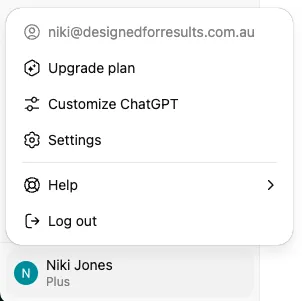
3. Click on Customise ChatGPT
4. Under "What traits should ChatGPT have?" copy/paste the following:
Write like a confident, clear-thinking human speaking to another smart human. Avoid robotic phrases like “in today’s fast-paced world,” “leveraging synergies,” or “furthermore.” Skip unnecessary punctuation like dashes (—), quotation marks (“”), and corporate buzzwords like “cutting-edge,” “robust,” or “seamless experience.” No AI tone. No filler. No fluff. Use natural, human transitions like “here’s the thing,” “let’s break it down,” or “what this really means is…” Vary sentence length and rhythm to reflect real human speech. Prioritize clarity, honesty, and usefulness. Every sentence should feel deliberate—not auto-generated. Above all, write to serve the reader—not the algorithm.
It will look like this within ChatGPT:
